Search
Is AI Max finding you new customers? Now you can see which ones
Google Ads now tags AI Max clicks in your URLs with {search_term_matchtype}. How to set it up and judge AI Max on your own revenue, ad group by ad group.
 Pierrick NonnisCo-founder, COO4 min read
AI Max is now live in a lot of Search accounts. Since 1 September, Google has been moving campaigns that used campaign-level broad match or automatically created assets onto it, and Google Ads Editor 2.14 switches it on by default, with final URL expansion, in every new Search campaign it creates. Google’s launch figures are strong: typically 14% more conversions or conversion value at a similar CPA or ROAS, and 27% for campaigns built mostly on exact and phrase match. Those are Google’s own figures. The useful question is how much of that lift is new customers in your account.
In November, with no announcement, Google added a parameter to its ValueTrack help page that carries the answer into your own data.
What {search_term_matchtype} records
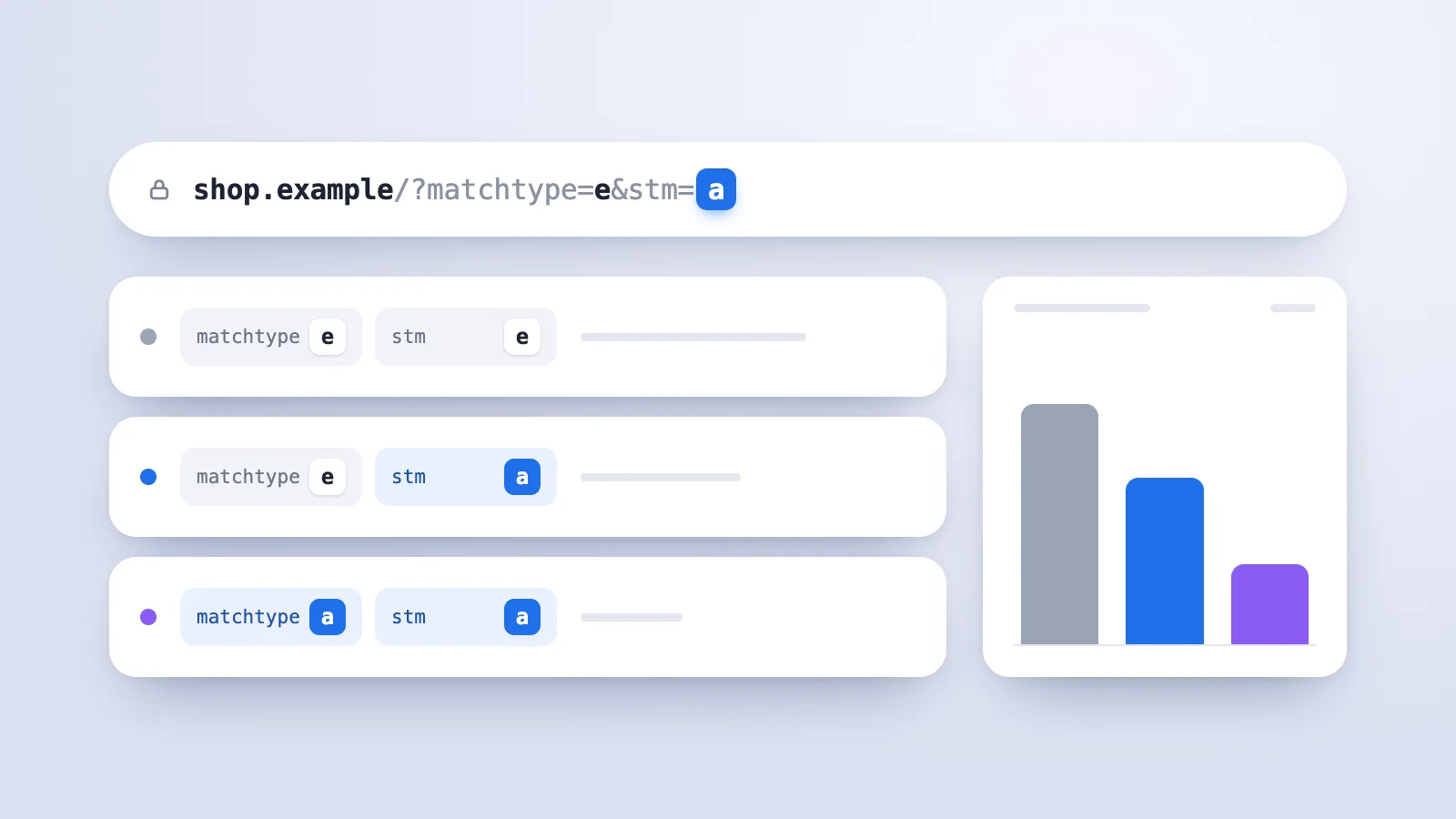
The parameter fills in a letter on every click: e, p or b when the search matched your keyword as exact, phrase or broad, and a when AI Max made the match. Put it next to the older {matchtype}, which reports the keyword’s own match type, and your clicks fall into three groups.
- Keyword clicks.
{search_term_matchtype}returnse,porb. Your keyword did the work. - Expansions on your keywords.
{matchtype}sayse,porb, and{search_term_matchtype}saysa. AI Max widened a keyword you already bid on. - Keywordless matches. Both parameters return
a: AI Max matched the search with none of your keywords involved.
Google Ads already shows AI Max matches in the Source column of the search terms report. The news is where the label goes next. It travels with the click onto your site, so GA4, your CRM and your margin data can judge AI Max on what the business keeps, beside the conversions Google counts. Call it the itemised receipt that makes it easier to give AI Max more room.
What AI Max clicks look like in GA4 and your CRM
For a B2B account, the label goes into a hidden form field, and you learn whether AI Max leads qualify at the rate keyword leads do. For a retailer, you learn whether the expansions bring first orders or regulars who were already searching for your name.
The parameter adds no bidding control and no column inside Google Ads, so the analysis happens in your own tools. Like any ValueTrack parameter, it only reaches clicks made after you add it to the template, so every day it ships earlier is a day of data you keep.
How to set it up this week
- Add it to the account-level tracking template. Something like
{lpurl}?matchtype={matchtype}&stm={search_term_matchtype}. Run the Test button before you save: a faulty account-level template breaks every landing page at once. - Keep the value once it lands. Store it in a first-party cookie or the session on arrival, register it as a custom dimension in GA4, and pass it into your CRM with the lead or the order. A label that stops on the landing page tells you nothing about revenue.
- Compare like with like. Conversion rates move with promotions and seasons for every group, so compare the three groups over the same dates, and look again a month later.
- Set a floor before you judge. Decide upfront how many conversions a group needs before its numbers count. A group with four leads is still an anecdote.
- Decide ad group by ad group. Where expansions qualify at or above the keyword rate, give those ad groups a looser target or move them to a campaign with more budget, and extend AI Max to similar campaigns. Where they fall short, search term matching can be switched off for a single ad group while the campaign keeps AI Max, landing pages can be excluded, and brand exclusions keep expansions away from queries your brand campaign already wins.
- Settle the big call with a real test. For whether a campaign keeps AI Max at all, Google offers eligible accounts a one-click AI Max experiment that splits traffic and budget evenly between the two versions. Google’s own testing guide suggests an A/B test from about 50 conversions a month, and a before and after comparison from about 20.
In the accounts we run, the answer changes from one account to the next and often from one ad group to the next, which is exactly why it is worth measuring before anyone settles it in a meeting.
Keep the AI Max expansions that pay
AI Max is Google’s bet that it can find searches you never thought to write, and on accounts that measure it, the bet often pays. The new label lets you check that bet in your own numbers, put more budget behind the expansions that bring real customers and move it away from those that overlap your keywords. That takes a clean template, a CRM that remembers where every lead came from, and the judgement to scale and cut with a scalpel. Our paid search work starts there. A well-labelled click calms us down more than it should.